Modern Resume Design Templates: A Practical Guide
In the world of job applications and freelance pitching, your resume is often your first impression. It's a single page that needs to communicate your professional story, skills, and value proposition clearly and quickly. While content is king, presentation is the castle it lives in. A cluttered, outdated, or generic layout can undermine even the most impressive experience. This is where having the right design assets becomes a practical advantage, not just an aesthetic choice.
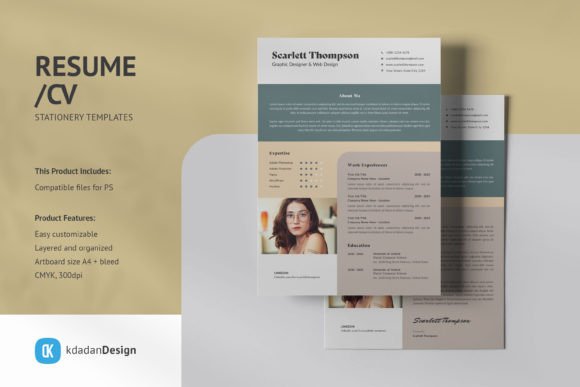
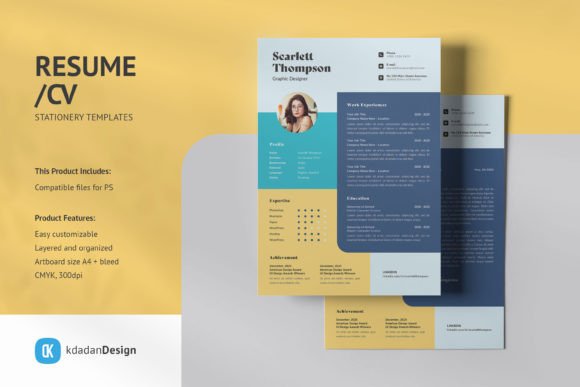
The Resume / CV PSD Design Templates Vol 210 is a collection built on a foundation of clean, modern, and professional aesthetics. It’s not about flashy graphics or trendy effects that date quickly. Instead, it focuses on modern typography, clear visual hierarchy, and structured layouts that guide the reader's eye naturally from your summary to your skills and experience. The overall personality is one of competence, clarity, and confidence—qualities any professional wants to project.
Where This Template Collection Shines
Think of these templates as versatile design assets. Their strength lies in their adaptability. A graphic designer might use one to showcase a portfolio link prominently. A marketing professional could leverage the clean sections to detail campaign results and analytics skills. An entrepreneur crafting a pitch deck might pull a single-page CV style for a company overview slide. The fully customizable and editable PSD template structure, with text, images, and graphics on separate layers, makes these kinds of adjustments straightforward. You're not fighting the template; you're using it as a framework.
The professional appeal extends across industries. The minimalist style works equally well for a tech startup applicant, a corporate finance role, or a creative agency submission. It avoids stylistic biases that might pigeonhole you. For small business owners or freelancers, having a consistently professional look across all client-facing documents—from proposals to invoices to your CV—builds a subtle but powerful brand identity. Using this template set as a base ensures that consistency is easy to maintain.
Practical Guidance for Implementation
Choosing a template is the first step. Evaluating its fit is next. Open the PSD file and look at the underlying structure. Does the information architecture match your story? If you have a dense work history but minimal education, a template with a large education section and small work area isn't ideal. The Resume / CV PSD Design Templates Vol 210 offers multiple layouts, so compare them side-by-side with your content outline.
- Font Pairing and Readability: The templates use free fonts (download links are provided). This is a significant practical benefit. Before finalizing, test the font pairings at print size. Print a draft. The specified A4 + bleed, CMYK, 300dpi setup ensures it’s print ready, but your home or office printer is the final proof. Check that the sans serif font for body text is legible at 10-11pt, and that any serif font or accent font for headings has enough contrast to create hierarchy without overwhelming.
- Smart-Object Workflow: The image containers are Smart-Objects. This is a huge time-saver. Instead of manually cropping and resizing your headshot in each template, you simply edit the Smart-Object once, and it updates across all files. This maintains consistency if you're using multiple templates from the set for different purposes (e.g., a detailed CV and a one-page summary).
- Customization and Brand Alignment: Replace colors & text easily to match your personal or company brand palette. This isn't about being flashy; it's about coherence. If your portfolio website and LinkedIn banner use a specific shade of blue, incorporating that subtly into your CV's headings or accent lines can strengthen your overall brand identity. The layered PSD file makes this color editing non-destructive and simple.
Beyond the PDF: Using the Assets
While designed as a resume/CV, the value of these premium font and layout assets extends further. The clean typographic system and grid layouts are excellent foundations for other projects. Consider using a template page as a starting point for:
- Client Proposals: The professional tone is perfect for outlining project scopes, timelines, and fees.
- Speaker or Workshop One-Sheets: Create a compelling single-page overview of your talk topics and bio.
- Portfolio Case Study Layouts: The structured sections can be repurposed to present a project challenge, your process, and the results.
- Internal Documents: Use the clean style for meeting notes templates, project briefs, or team announcements to elevate internal communications.
The key is to view the Resume / CV PSD Design Templates Vol 210 not as a rigid form to fill out, but as a starter kit for professional communication. Its focus on modern typography and clean design means the output always looks intentional and polished. By leveraging the Smart-Objects for images and the easily editable layers for text and color, you save significant production time. That time can be better spent tailoring the content to the specific opportunity, which is where it truly counts. In a competitive landscape, having a toolkit that ensures your presentation is never the weak link is a practical edge worth having.